This article will explain the steps to adjust the sensitivity of the E3AS-HF Sensor.
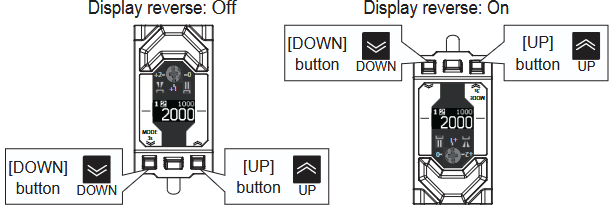
- Press and Hold the Down button for 3 seconds
- Using the Up or Down button (short press), navigate until you see an “Adv. Setting” option.
- Enter into this using the teach button (short press) and toggle it to “On” using the arrow keys

- There will now be more options available in the settings, navigate until you locate “Sensitivity”. Using the same methods above, enter into this setting and select the desired sensitivity level.
